

Setting up Source Maps for CoffeeScript in Rails
by Amitava,
[IMPORTANT] Only works in development environment.
Source maps are a language agnostic way to map minified, combined or pre-processed code to the original source file. This becomes highly useful as it helps to debug or inspect compressed client-side code in browser (depends on browser support).
When using CoffeeScript we often find it difficult to locate the exact location of an error, since the line numbers in generated javascript code does not match with the original coffee file.
Using source maps we can instruct the browser to load the original coffee file and show us where the error has occurred. Also it is possible to debug a coffee file in a browser by setting breakpoints.
Let's find out how to add source maps support for CoffeeScript. Requires CoffeeScript 1.6.1 or above.
- Install coffee-rails-source-maps.
- Enable source maps in Google Chrome by going to Settings page in the devtools panel and checking 'Enable source maps'. Requires the latest version of Chrome.
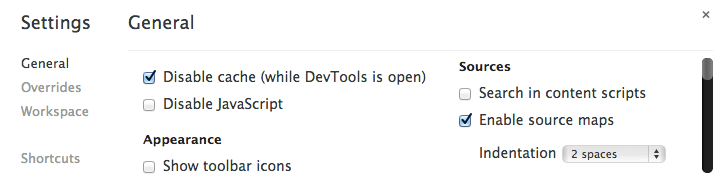
Next time reloading the browser will generate source maps inside
public/assets/source-maps directory and Chorme DevTools will display any js
error right inside the coffee file instead of generated js code.
Source maps greatly simplifies the process of debugging CoffeeScript right inside the browser. However as mentioned at the beginning of this post, it only works in development at the moment. Adding support for production is quite challenging since it would require to map a single combined and minified file to the original source files. uglifier already seems to have support with this pull request and sprockets is also getting ready to add it to the asset pipeline. Hopefully Rails will pretty soon have support for source maps in production environment.
What about Firefox?
At the time of this writing Firefox 24 also has source maps support, however it didn't work as expected as it did seemlessly in Chrome. Here is a good example of how to enable source maps it http://www.codeproject.com/Articles/649271/How-to-Enable-Source-Maps-in-Firefox.